
PROFINET is the industry leader for networking in automation. It connects devices, systems, and cells, for faster, less costly, more reliable, manufacturing that produces higher quality products in a safer, environmentally responsible way. Further, it easily integrates with existing systems and equipment while coexisting with all other Ethernet protocols to enable vertical integration from the factory floor to the cloud.
1.0 – PROFINET
PROFINET is the world’s most advanced Industrial Ethernet solution. It is a communication protocol to exchange data between controllers and devices. Controllers can be PLCs, DCSs, IPCs, or PACs. Devices can be I/O blocks, vision systems, RFID readers, drives, process instruments, proxies, or even other controllers. PROFINET is fully compatible with – and leverages all the features of – office Ethernet. However there are differences. Office Ethernet is not capable of real time performance for industrial automation; it is also much less able to withstand harsh industrial environments.
Based on its experiences with PROFIBUS, PI Working Groups comprising more than 500 experts from major automation suppliers spent many years creating a comprehensive real time Ethernet solution for automation: PROFINET.
This solution is able to operate in the difficult industrial environments and is capable of delivering the speed and precision required by manufacturing plants. It can also provide additional functions – for example, Safety, Energy Management, and IT Integration. These can be used in combination with the control and monitoring functions. Users have a choice on which services they would like to utilize.
Here are some other advantages of working with PROFINET at the I/O level:
- Lower costs for production/quality data monitoring
- Highly scalable architectures
- Access to field devices over the network
- Maintenance and servicing from anywhere (even over the internet)
- Best in class diagnostics
1.1 – Why Use PROFINET?
By now, we’ve all heard of Industry 4.0. But what does that term really mean and why do we need PROFINET? In its simplest form, the big picture vision of Industry 4.0 is to reimage how we do things – from enabling new production capabilities and creating value, to augmenting real-time operation. But this vision isn’t going to happen overnight. It’s going to happen slowly and it’s going to happen methodically.
In practical terms, Industry 4.0 is the digital transformation of manufacturing so we can turn data into information and turn that information into some type of action, improve a process, or improve product quality.
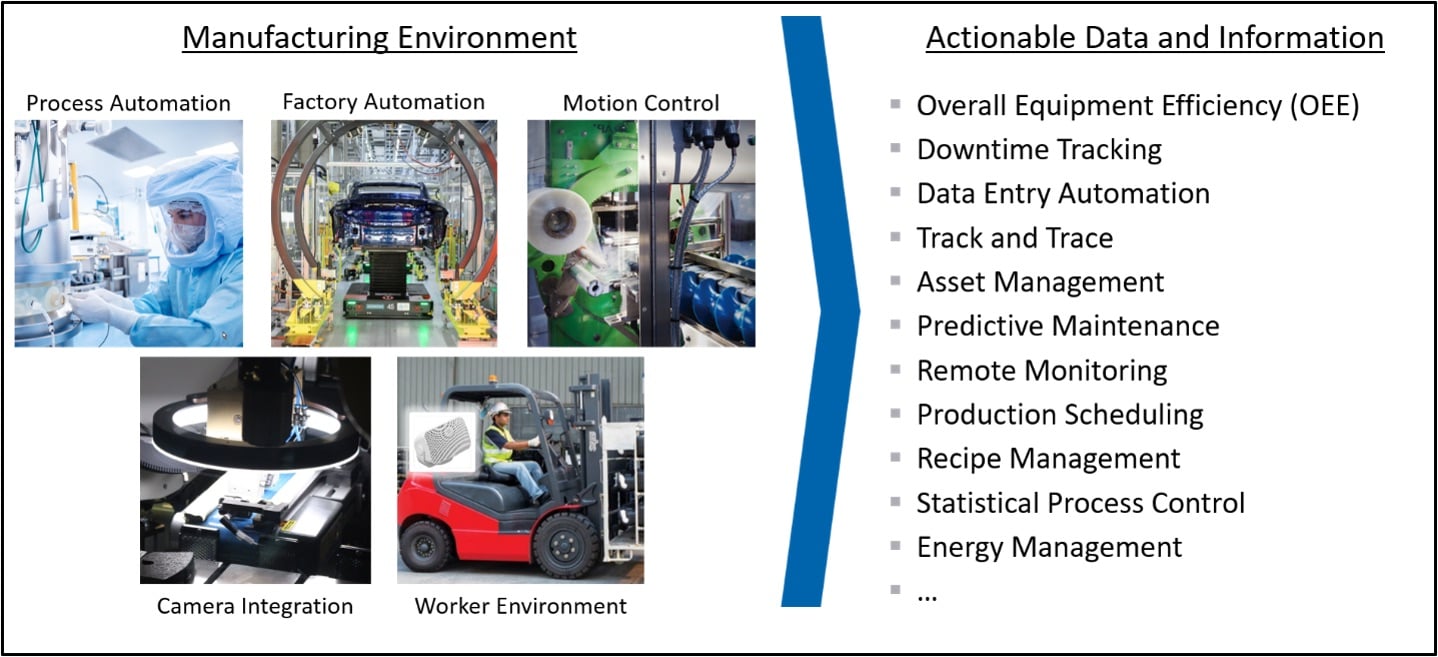
We look at the manufacturing environment as a connected environment of people, processes, data, and services regardless of the type of automation we are using. With this view, we can turn data into actions like managing assets, or tracking downtime, or changing production schedules based on predictive maintenance information. We can also use data to keep processes in control, optimize machine efficiency, or minimize energy consumption. Really, the possibilities are endless, but they all drive us towards the vision of Industry 4.0.
And nowhere is the impact of this digital transformation greater than on factory networks. There has been an explosion of devices in manufacturing facilities, and it’s not uncommon for car manufacturers to have over 50,000 Ethernet nodes in just one of their factories. Large production cells can have up to 1,000 Ethernet nodes in them. But the point is, all of these nodes increase the amount traffic automation devices must handle. It’s not unrealistic for a device to have to deal with over 2,000 different messages while it’s operating – while it’s trying to do its job.
Technologies like Automated Guided Vehicles add a level of dynamics to the network architecture because they are constantly entering and leaving various production cells located in different areas around the factory. And as these factories become more and more flexible, networks must support adding and removing devices while the plant is in production.
So in response to this digital transformation, we have gone from rigid, hierarchal systems using fieldbuses, to Industrial Ethernet-based networks where any device can be connected to any other device.
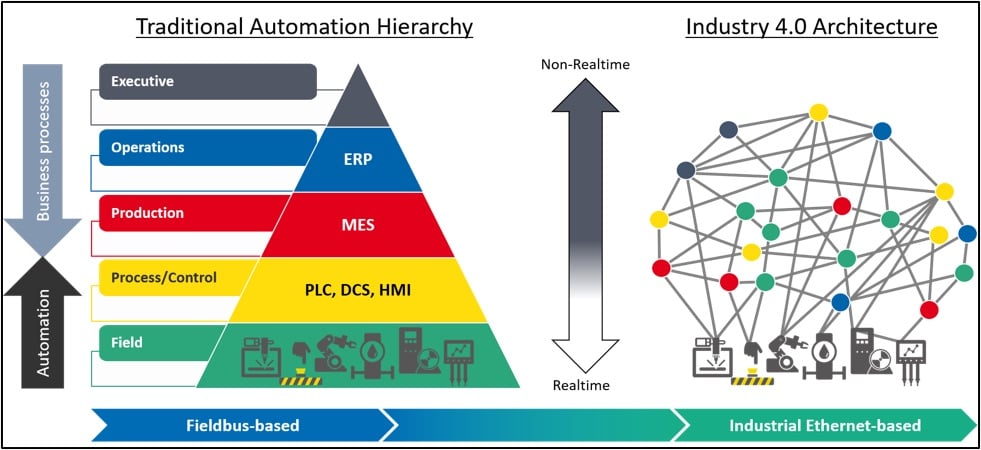
This means devices at the field level can be connected to devices at the Process/Control level, the Production level, even the Operations level and above. But this doesn’t mean the requirements for determinism, redundancy, safety, and security are any less on a converged network, it means you need to have a network technology that supports these requirements.
And this is why we need PROFINET …
1.2 – What is PROFINET?
Then, what exactly is PROFINET? And what challenges is it trying to overcome? The most obvious challenge is environmental. We need to operate in a wide range of harsh environments. And we obviously need to be deterministic, meaning we need to guarantee data delivery. But we have to do this in the presence of IT traffic, or non-realtime applications like web servers. We also can’t operate in a vacuum – we need to operate in a local area network, and support getting data to wide area networks and up into the cloud.
Simply put, PROFINET is a communication protocol built for deterministic exchange of operational data between controllers and devices. On top of this fundamental communication capability, PROFINET provides additional features to increase manufacturing reliability, system availability, machine maintainability, device interoperability, safety, and secure access data access for vertical integration. These features are:
- Physical Layer
- Protocol coexistence
- Realtime Data Exchange
- Time-Critical Performance
- Diagnostics
- Simple Device Replacement
- System Redundancy
- Media Redundancy
- Dynamic Reconfiguration
- Application Profiles
- Secure Data Access
- Vertical Integration
2.0 – PROFINET Features
Let’s get into the details about PROFINET features in the sections below.
2.1 – Physical Layer
To understand PROFINET, it is instructive to start with the OSI model because the model defines networking and, well, PROFINET is a networking technology.
The OSI model is divided into 7 layers starting with the physical layer. This is where we get access to the wire and turn electrical signals into bits. Layer 2 is the data link layer and this is where we turn bits into bytes that make up an Ethernet Frame. The physical layer is standardized by IEEE 802.3 and the data link layer is standardized by IEEE 802.1. These two layers comprise Ethernet that we use everywhere today.
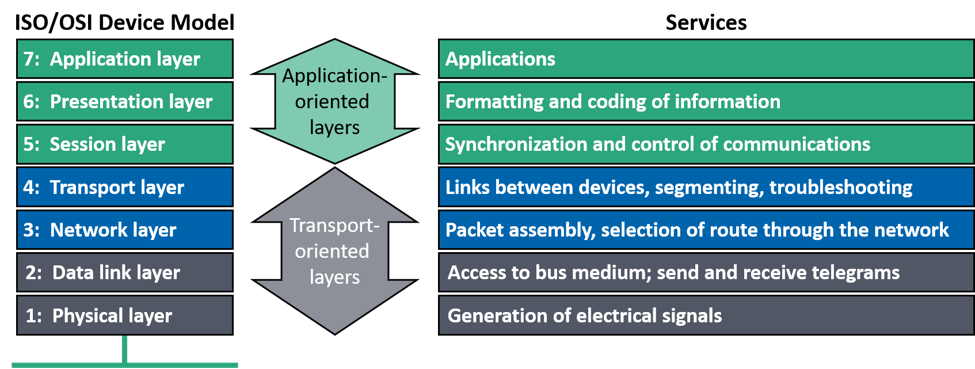
PROFINET can work on any Ethernet network and coexist with any other Ether net-based protocol. PROFINET simply adds features to make it more deterministic and protect it from the harsh environment in the factory. We also add features that allow us to use PROFINET to meet high precision determinism needed for advanced motion control. As we discuss these features in the sections below, keep in mind that these features do not make PROFINET incompatible with standard Ethernet, it only makes it more robust. This is why we call PROFINET an “Industrial Ethernet” protocol to distinguish it from regular “Office Ethernet”.
2.2 – Protocol Coexistence
PROFINET uses communication channels for speed and determinism. It uses standard unmodified Ethernet so multiple protocols can co-exist on the same wire. We didn’t have this with Fieldbuses – it was one protocol, one wire.
So, we can think of PROFINET as separating Ethernet traffic into a realtime channel and a non-realtime channel. We use the non-realtime channel to pass information like configuration, security, and diagnostics. The realtime channel is used to periodically update controller and device IO data.
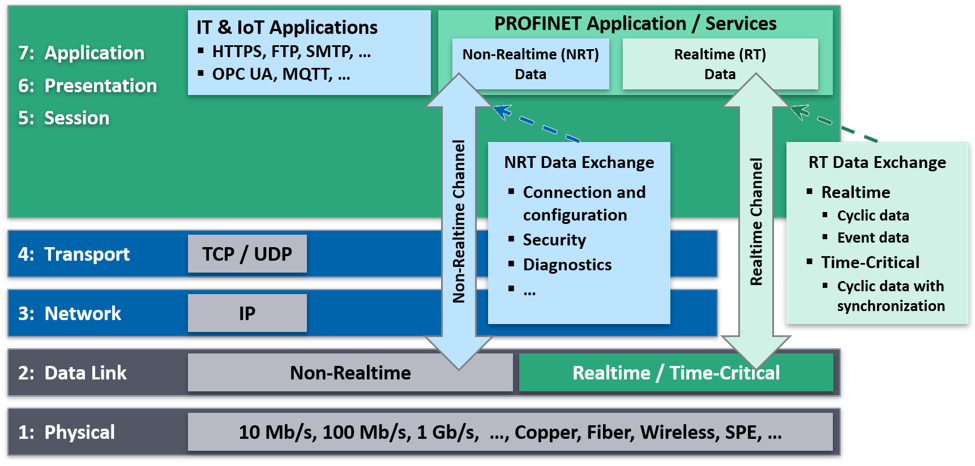
Realtime data exchange with synchronization is classified as “Time-Critical”, and without synchronization it is classified as “Realtime”. But the point is, this is how we can use the same standard unmodified Ethernet for PROFINET as we can for any other IT protocol. All messages living together, coexisting on the same wire.
2.3 – Realtime Data Exchange
When we talk about messages being Non-Realtime, Realtime, or Time-Critical what we are really doing is specifying a level of network performance.
Non-Realtime performance has cycle times above 100 ms, but we can also use this term to indicate a message may have no cycle time at all. Realtime performance has cycle times in the 1 to 10 ms range, but really, that range can extend up to 100 ms. Time-Critical performance has cycle times less than 1 ms, and it’s not uncommon to have cycle times around 250 μs or less.
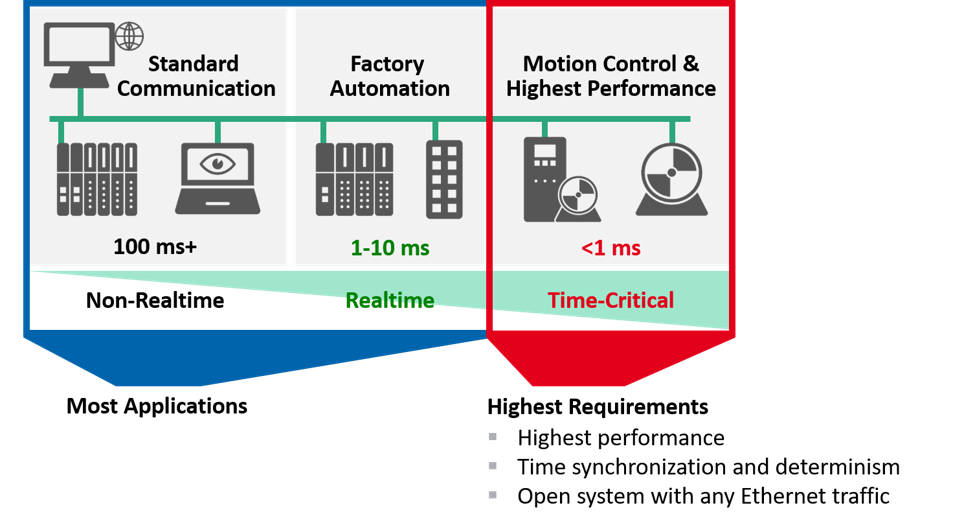
Most applications are either Realtime or Non-Realtime while high performance applications are considered Time-Critical. These applications use time synchronization to guarantee data arrives exactly when needed, but we also ensure the network is open to any Ethernet traffic. It is this realtime data exchange along with time synchronization for time-critical data exchange that are the main features that distinguish “Industrial Ethernet” from “Office Ethernet”.
2.4 – Time-Critical Performance
In order to achieve time-critical performance for the most demanding applications like high-speed motion control, four features were included in PROFINET. When we use these four features we call this PROFINET Isochronous Real-Time, or PROFINET IRT. These four added features are Synchronization, Known Arrival Time, Scheduling, and Time-Critical Domains. PROFINET IRT has been around since 2004, but in the future, PROFINET will move to a new set of IEEE Ethernet-based Standards called Time Sensitive Networking, or TSN. This PROFINET over TSN will have the same functionality and performance as PROFINET IRT, but, since TSN isn’t ready yet, let’s take a quick look at these four features.
All Devices in a PROFINET IRT network segment must support Synchronization. We use a Profile of IEEE 1588v2 called the Precision Transparent Clock Protocol to ensure each Device has the same time with an accuracy of less than 1 µs, and it provides this accuracy for more than 64 devices – no matter where a device is located in the PROFINET IRT network segment. We use synchronization because it allows us to start cyclic data exchange at precisely the same time on each device, and we use the first phase of the cycle to reserve bandwidth. By reserving bandwidth, we are able to guarantee standard Ethernet messages will not interfere with time-critical messages. This is what allows time-critical messages to get to their destination with a “known arrival time”.
The combination of synchronization and bandwidth reservation allows us to define exactly when a device sends or receives a message. So, we create a schedule of messages for each device in the PROFINET IRT network segment, and we use an engineering tool to do this. Once all schedules are complete, the engineering tool downloads them to the Controller. The Controller then sends each device its own schedule when communication is established. This is how we achieve scheduling.
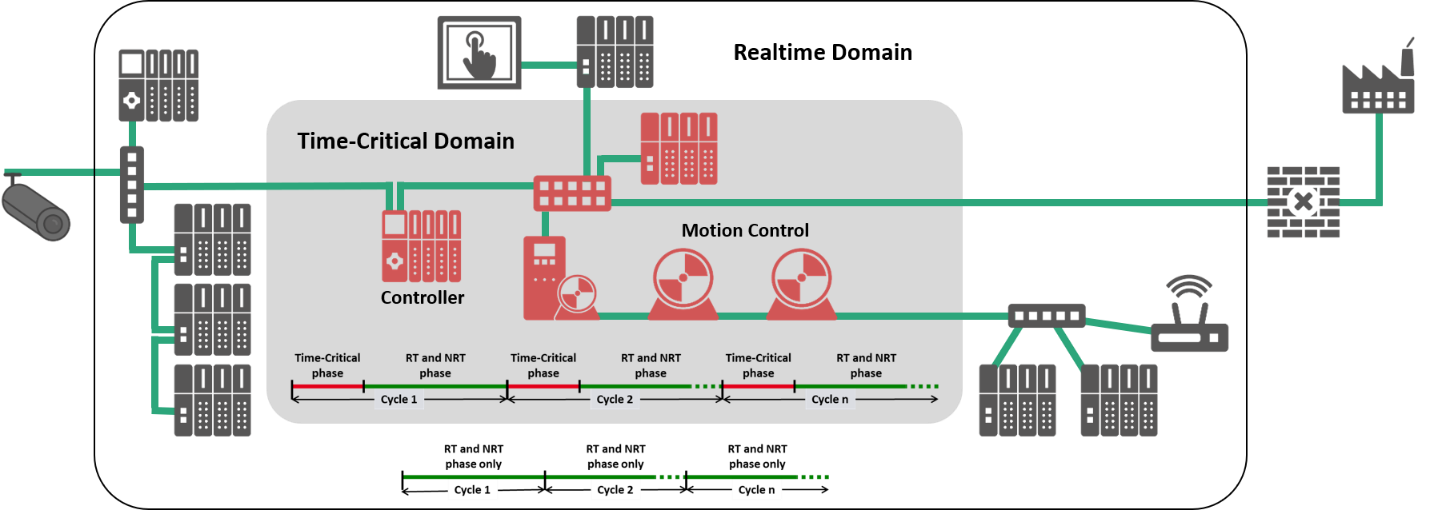
All of the devices connected together in a PROFINET IRT network segment are called a “Time-Critical Domain”. This is just a functional grouping of devices supporting time-critical, cyclic data exchange”, and only these devices can be part of the domain. However, any standard ethernet device can be connected to any device with available port in the time-critical domain. And more importantly, the time-critical domain is transparent to all Ethernet traffic – meaning all messages are free to communicate with devices either inside or outside the domain.
2.5 – Diagnostics
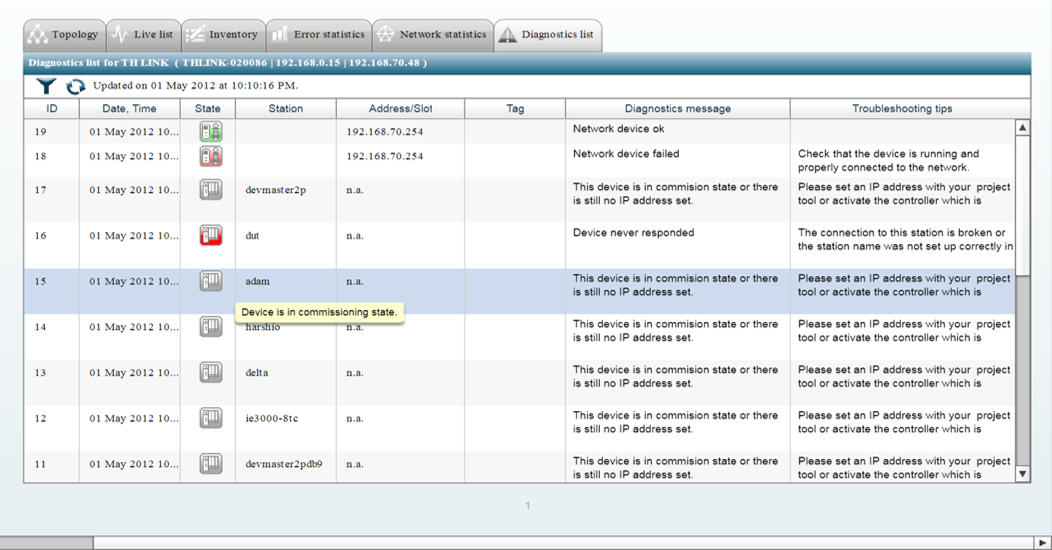
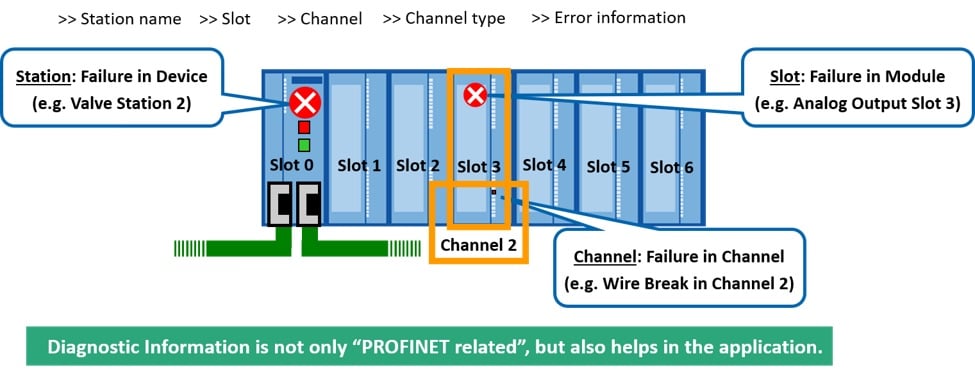
Perhaps one of the most important features to ensure uptime is PROFINET’s diagnostic capability.
Each field device provides users with the ability to select a set of indications that they care about in the event there is a particular internal issue of concern. These indications alert the controller to device faults as soon as they occur or as soon as they get resolved. The controller passes along this fault information to an HMI or other operator station so operators can assess what needs to be fixed. This is how PROFINET increases the level of machine maintainability in a factory.
2.6 – Simple Device Replacement
Once PROFINET’s diagnostic capabilities help determine which device has a fault, that device can be easily replaced with a new device, without any user configuration.
When the user manually replaces the failed device for a new one, the controller detects the new device and assigns the respective IP address, name, and related configuration. There is no need to use engineering tools or reconfigure the network.
2.7 – System Redundancy
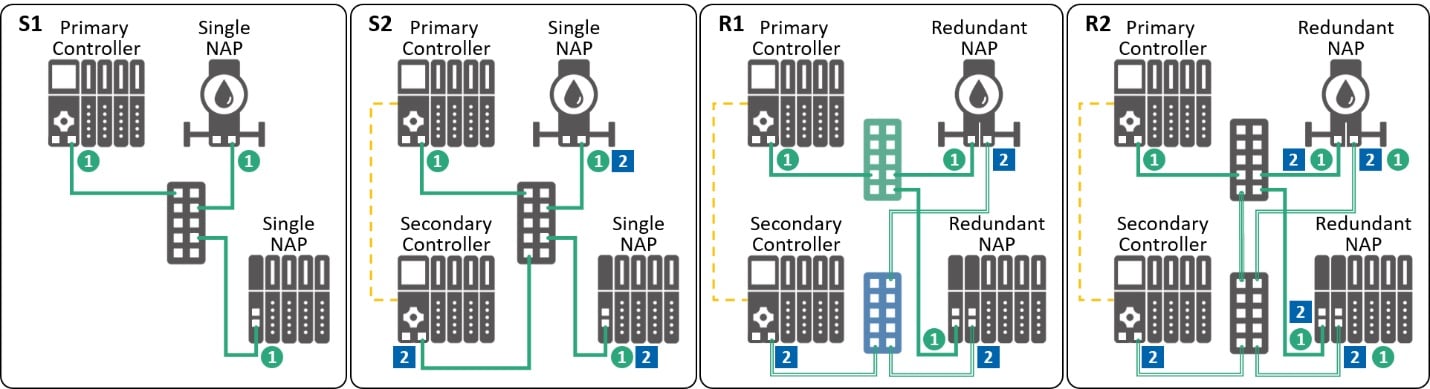
PROFINET adds network connections to increase the level of system availability and reduce manufacturing downtime.
These connections allow the use of a primary and secondary controller so these controllers can both talk to the field devices in the network. If the primary controller has an issue, the secondary controller can take over so the system continues operating while the issue gets resolved.
2.8 – Media Redundancy
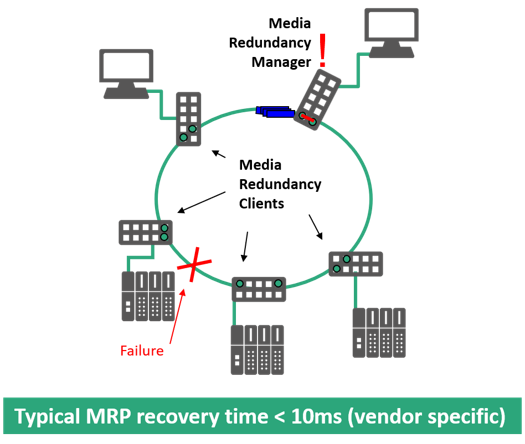
Network topology plays an important role in manufacturing uptime as well. If a forklift runs over a cable, a connector is intermittent, or field device loses its connection, these situations can cause operational problems.
In order to minimize the risk of these failures that lead to network outages, PROFINET uses rings to keep the network operational. If there is a failure in the ring, it can revert to two line segments and keep data flowing to the devices while the network cable, connector, or connection is repaired.
2.9 – Dynamic Reconfiguration
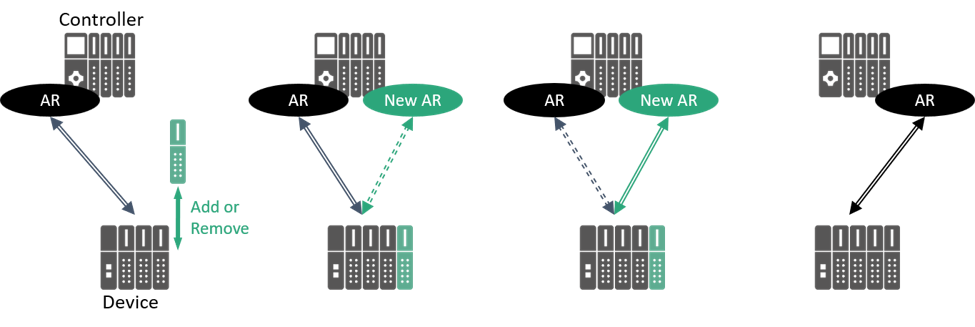
In order to increase availability and support the high availability needed to keep process plants operating 24/7/365, PROFINET uses Dynamic Reconfiguration for uninterrupted operation even when a change is required.
Typically, a change requires the PLC to first go into stop mode, receive the new configuration, and then go back into run mode. Well, this doesn’t work when we are trying to keep process plants operating 24/7/365. So PROFINET has the capability to add or remove devices “on-the-fly” while the plant is in production.
2.10 – Application Profiles
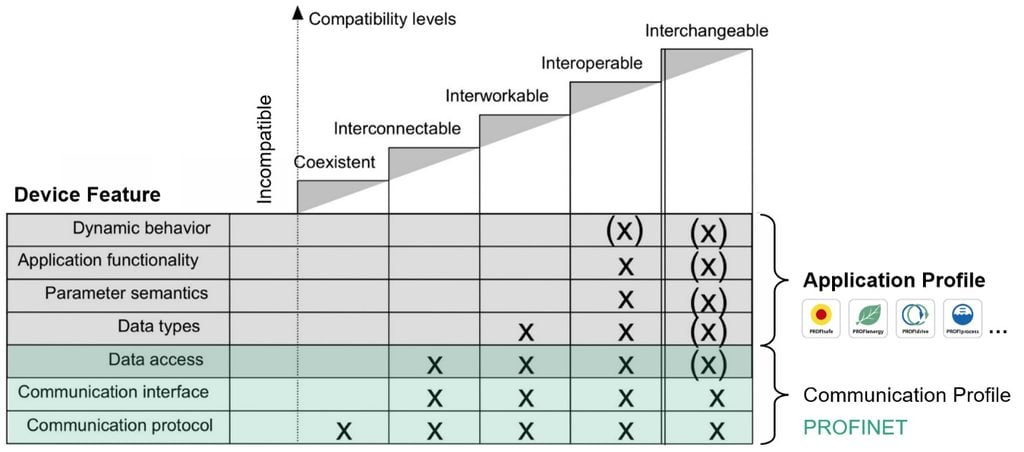
PROFINET uses application profiles to increase the level of compatibility between devices in a network.
The first level of compatibility is at the PROFINET communication level by standardizing the protocol, interfaces, and data access. Here, we can achieve co-existence and inter-connectability at the communication level. Application profiles take it a step further by standardizing data types, semantics, and functionality. Here, we can achieve not only interoperability but even, in some cases, device interchangeability. PROFINET has roughly two dozen application profiles in total with PROFIsafe, PROFIenergy, and PROFIdrive being the most popular. The PROFIsafe application profile is where we can increase the overall functional safety of the system. PROFI energy helps minimize energy consumption, and PROFIdrive helps increase the level of interoperability between drives in a motion control system.
2.11 – Vertical Integration
There are a number of protocols that support Vertical Integration like OPC UA, MQTT, and even REST APIs.
OPC UA is one of the more popular protocols because the real power of OPC UA is its information models – they are self-describing, machine-readable, semantically rich. So now, a machine can connect to an information model, and it doesn’t need to know a priori what it’s looking for or how the data is arranged – the information model itself tells it. Then, how do you decide where to add Vertical Integration?
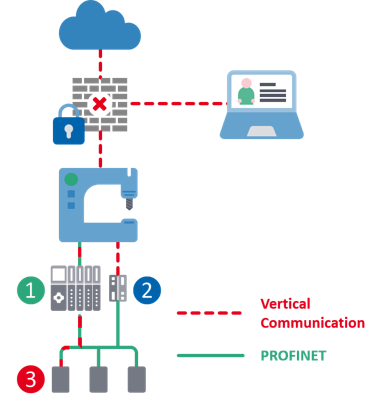
Well, it makes sense to add it to the PLC if you find yourself in a Greenfield Installation and the data is dependent on the PLC application – or you want to combine the data with other PLC information. However, you need to make sure you don’t impact PLC performance by adding services like an OPC UA Server.
An Edge Gateway makes sense if you find yourself in a Brownfield Installation and don’t want to touch the PLC – or you have lots of devices and need a central location for all the data.
And finally, you can get data directly from a device if adding services, like an OPC UA Server, will overload the PLC or Edge Gateway – or you happen to be in a decentralized environment. But in any case, choose an integration method – like using a PLC, a Device, or an Edge Gateway – and then choose the protocol that best suits your needs.
2.12 – secure data access
What’s the number one concern with vertical integration and making data available to the use? You guessed it … Security.
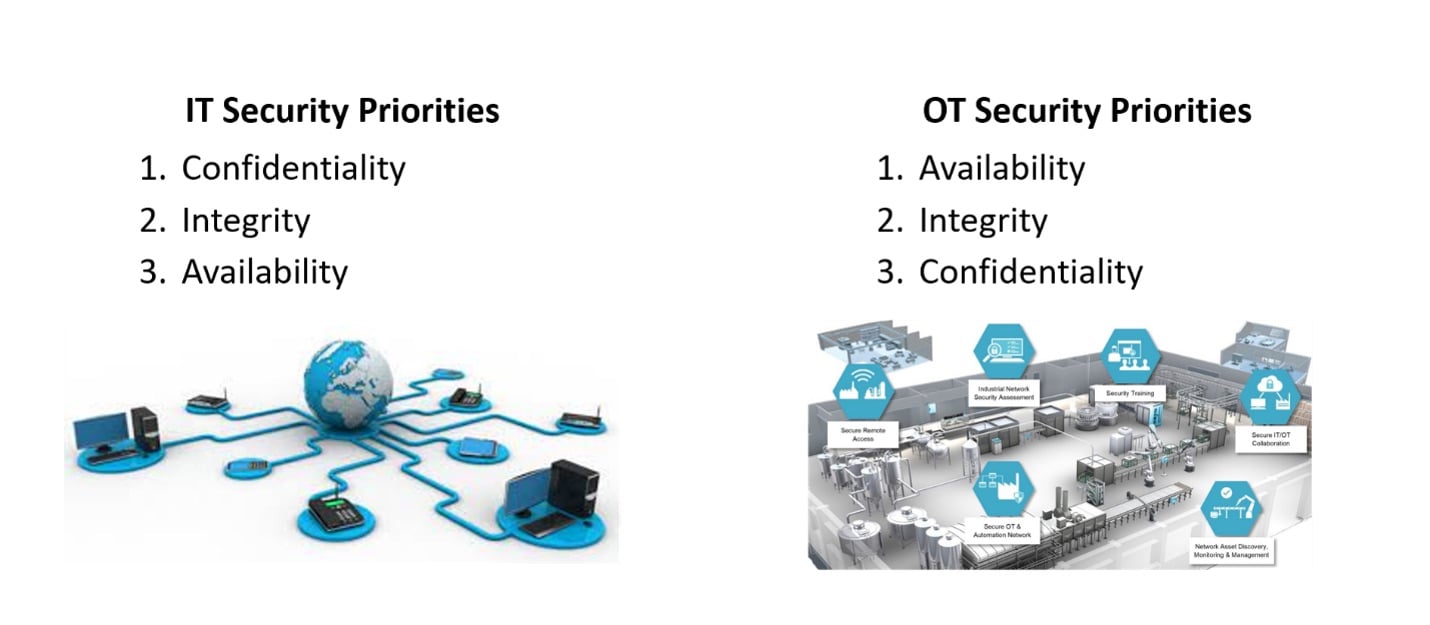
In the IT world, confidentiality is paramount followed by integrity and then availability. This is the well-known CIA-triad for IT network security. In the OT world, these priorities are flipped. Availability is paramount because we need to ensure realtime data exchange to keep the factory operating. Then we are concerned with integrity and finally confidentiality.
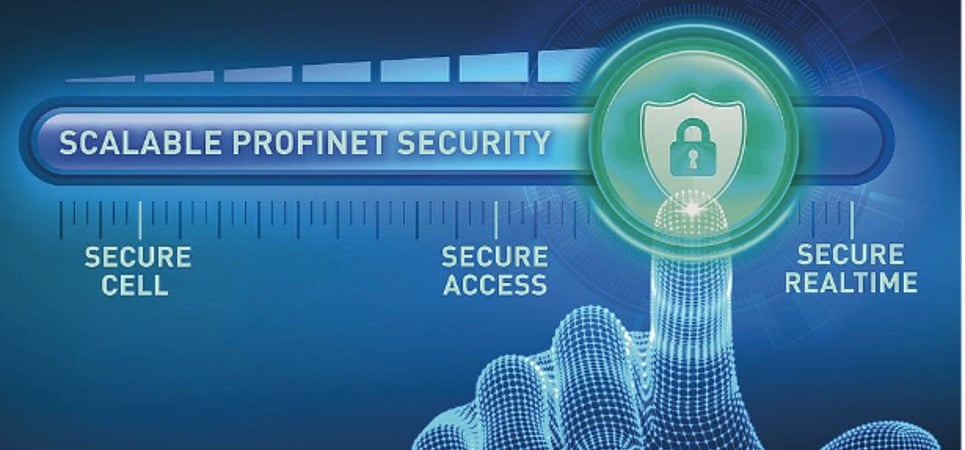
So, to bridge the gap between IT and OT security priorities, PROFINET uses a three-tier security model that is “scalable”. The first tier provides protection around the cell’s perimeter. The second tier adds non-realtime, secure PROFINET access to devices inside the cell. The third tier ensures realtime communication is secure inside the cell without impacting realtime data-exchange that keeps the factory operating. All security features used in each tier increase secure access to devices in the network because they are integrated into the core of PROFINET and based on state-of-the-art standards already used in industry.
3.0 – Using PROFINET
Designing and engineering a PROFINET project is straightforward, especially if you already have fieldbus experience.
Migrating from a fieldbus to Industrial Ethernet is particularly easy. Even those who don’t have any experience should rapidly pick up the theory and practice of PROFINET. In this section, we’ll talk you through the basics.
Remember, PROFINET offers a modular approach to automation. That means it’s flexible and versatile. Not everything needs to be utilized so, ‘start slowly and build’.
3.1 – Network Design
Ethernet is a highly scalable and versatile communications technology. It can be deployed in line, tree, tree and branch, star and ring architectures and both IO and peer-to-peer communications are possible.
Like office networks, PROFINET uses Ethernet switches to connect devices. PROFINET switches can be external infrastructure components or integrated switches. In general, the only requirement for Ethernet switches in a PROFINET network is 100 Mbps full duplex transmission. Most Commercial Off-The-Shelf (COTS) switches can work in a PROFINET network. However, there are many factors to consider when selecting a device, such as the installation environment (harsh manufacturing environments) and requirements for specific PROFINET features. The following section on Selecting will give further details.
In addition, specialized ASIC-based switches are now being fitted into many end devices. Both 2 and 4 port versions are available. Onboard 2-port switches allow easy ‘daisy-chaining’ of devices to enable bus-like line networks to be created. Design considerations here include taking into account accumulated switching delays. In linear networks, 10 switches in a line are usually the desirable maximum.
If HMI traffic and data-intensive signals (e.g. vision) are required, it’s worth paying attention to overall bandwidth requirements. PROFINET’s ability to reserve bandwidth for particular functions means that limitations rarely occur. It also means that multiple-functionality can exist on a single network.
For high integrity systems, PROFINET supports media redundancy with ring topologies. If a cable or device fails, then the system automatically segments itself into a ‘line’ topology to keep the rest of the system active.
3.2 – Device Selection
To ensure the highest quality performance and to guarantee interoperability it is a mandatory requirement that all PROFINET products are certified. Only in that way users can have full confidence in their purchases. A list of products can be found in the Product Finder on the main profibus.com PI website. NOTE: it is the responsibility of the manufacturer to maintain the listing of their products there! If a product cannot be found as such, it does not necessarily mean the product has not been certified. Check with the device manufacturer for a certificate.
For infrastructure devices such as switches, COTS (Commercial Off-The-Shelf) can be utilized. However, here is a list of the parameters that are important (and not important!) to PROFINET to guide you in making the right choice:
| Feature | Description | Used in PROFINET? |
|---|---|---|
| Managed vs. Unmanaged | Managed switches offer advanced features | Both can be used |
| Quality of Service (QoS) | Prioritize frames according IEEE 802.1p/q | Recommended |
| Trunking | Increases bandwidth | Useful |
| VLAN | Isolates traffic in different network sections | Useful |
| Port Mirroring | Helps to monitor the traffic of a device | Useful |
| IGMP Snooping | Reduces Multicast flooding* | Not needed by PROFINET |
(*Why is Multicast an issue? Multicast is a default Ethernet mechanism used by some Industrial Ethernet protocols. It distributes every message to multiple receivers. This can quickly lead to ‘flooding’ of the network … and not just the automation network either as it will jeopardize the performance of any connected office Ethernet too! Therefore, in an Industrial Ethernet based on multicast messaging, all switches have to support a special feature called ‘IGMP Snooping’ which monitors what is happening and takes appropriate action to prevent ‘flooding’. This adds to costs. PROFINET uses only unicast messages and is not troubled by the requirement.)
3.3 – Installation
Standard ‘best practice’ in cable installation and maintenance should be followed at all times. Here are a few installation tips that should be borne in mind:
Remember, PROFINET offers a modular approach to automation. That means it’s flexible and versatile. Not everything needs to be utilized so, ‘start slowly and build’.
- Remember that the environment you are planning for may be dirty, dusty, electrically noisy and generally unfriendly to data transmissions and infrastructure components of all types.
- Normal twisted pair cabling is suitable for PROFINET. TCP/IP has methods in place to resend telegrams when lost but the timing is not acceptable for industrial use! In other words, electrically noisy environments can easily interrupt your data flows and may cause control malfunctions. In these situations, always use Shielded Twisted Pair cabling.
- Grounding at both ends is best. However, it’s not always applicable due to ground loops.
- The need for shielding is independent of the protocol used. All Industrial Ethernet protocols – and indeed fieldbuses – need protection in noisy environments. If you used shielded cable with DeviceNet or PROFIBUS, use shielded cable with PROFINET as well.
- Use PROFINET-rated cable.
- Always use rugged connectors too. Field installable RJ-45 types are available, as illustrated.
3.4 – Commissioning
There are many resources that you can call on to help with commissioning:
- A PROFINET Commissioning Guideline is available, together with a separate Word file, which provides protocols and checklists for individual adaptations. The commissioning guideline explains setting IP addresses, PROFINET device names and typical steps to configure real time IO devices with their GSD files, and proper network measurements.
- Excellent engineering and test tools designed for use with Industrial Ethernet in general – and PROFINET in particular – are available from many sources. Such tools can investigate full Ethernet and PROFINET activity, provide a detailed analysis of parameters such as delays and jitter, and time stamp frames for later assessment.
- General-purpose Ethernet tools include the Wireshark software analyzer which uses the Ethernet ports on a PC as the analyzer hardware. Wireshark is license free and acts as a sniffer to analyze the Ethernet traffic.
3.5 – Maintaining
Standard Ethernet has a set of diagnostic tools and protocols that will be familiar to office-based technical personnel. These can be utilized in the industrial environment to provide detailed information about lower-level transport-oriented issues such as TCP, UDP and IP activity. They can also support statistical and connection analysis.
Standard Ethernet protocol tools
The use of familiar Ethernet protocols means that browser based access to individual devices is possible from any PC in any location – even over the internet. Many PROFINET devices incorporate a web server for this purpose. A browser can also read out information such as device status and configure a device either locally or from a remote site.
IT protocols familiar from the industrial world include SNMP (for managing components such as switches and reading statistics and diagnostics). Again these can be used from anywhere in the network. Another familiar protocol is LLDP which is used for mapping network topologies for making device replacement easy.
PROFINET-specific tools
The PROFINET specifications also include a set of specific diagnostic tools which operate at the application layer level. These provide more advanced diagnostics capabilities in standardized formats. Some allow for remote monitoring of networks, and some are intended for on-site use.
Simple Device Replacement
Many devices can be replaced in the field without the need for configuration – no computer is required; you just take the new device out of the box and install it in place of a failed unit.
4.0 – Migrating from PROFIBUS
If you have PROFIBUS networks already installed, or if you’ve got PROFIBUS skills available in your plant then migrating from PROFIBUS to PROFINET will be quick and simple. That’s because the Working Groups which developed PROFINET drew heavily on the experience of PROFIBUS. For example, if you’re familiar with GSD files for engineering you’ll be familiar with the GSDML files used by PROFINET. Likewise, the diagnostic functions. Also, many of the PROFIBUS profiles – for example, PROFIsafe and PROFIdrive – will also be familiar.
The migration process to PROFINET was made simple not only for PROFIBUS but also from many other existing protocols. PROFINET achieves this through the use of the unique ‘proxy’ concept, which is covered in detail in this section. Proxies are part of the PROFINET specification and perform consistently across all protocols. PROFINET proxies are defined for the following protocols:
- CC-Link
- PROFIBUS DP
- PROFIBUS PA
- HART
- INTERBUS
- DEVICENET
- Foundation Fieldbus
- CANopen
- Modbus
- IO-Link
- AS-i
PROFINET is alone in being able to integrate many popular fieldbuses, making it the ideal way to move to Industrial Ethernet architectures.
Special Note: In addition to the proxy migration option, a wide range of gateway devices exists for connecting legacy protocols to PROFINET from various vendors.
4.1 – The Proxy Concept
A PROFINET ‘proxy’ is a black-box interface sitting between PROFINET and a sub-network such as PROFIBUS. It differs from a conventional gateway device in that it maps the underlying protocol to PROFINET. This allows a controller on the PROFINET network to access devices on the sub-network with ease because all functions and services are directly available without further interpretation.
With proxies, investments in the skills, equipment, and software associated with the sub-network can be retained. No changes to automation systems at the fieldbus level are required; fieldbus networks can simply be connected into the PROFINET architecture and utilized as before. Therefore, PROFINET can greatly assist in the expansion and deployment of distributed automation architectures. It also simplifies greater vertical integration, moving manufacturing closer to enterprise IT networks.
PROFINET is also highly scalable and modular in concept, not every feature needs to be deployed at once. New users can start simple and build as required. Migration can happen in steps, allowing plant and personnel to build experience while improving productivity and profitability.
4.2 – Migrating to PROFINET
Many of the design, engineering and deployment issues for PROFINET resemble those of PROFIBUS. However, PROFINET offers additional capabilities.
- Simple device replacement: Just physically replace a device when it fails. There are no switches to set and no computer is needed.
- Device names: Meaningful names can be allocated by the user which contributes to much simpler replacement procedures. The PLC assigns an IP address to the node.
- Standard wireless: Familiar WLAN and Bluetooth protocols are used.
- More topology options: Ethernet offers many more topology options, including star, ring and tree structures which make it easier to design and commission according to the layout and functions of a plant, especially where redundancy, long distance, and remote connections are needed.
- Shared Device/i-Device: One device can be accessed by more than one controller. This flexible assignment of modules to different controllers suits many applications, for example, a single sensor that participates in a safety function and needs to communicate with a failsafe PLC. An IO-controller can also operate in a so-called i-Device mode, in which it combines the IO-Device functionality with an IO-Controller function on the same interface (see diagram).
4.3 – PROFINET Features vs. PROFIBUS
PROFINET offers much higher performance than PROFIBUS and other fieldbuses in terms of:
- Unlimited scalability
- Unlimited address space
- Larger message size (1440 bytes vs. 244)
- Machine to Machine (M2M) communication
- Vertical integration capabilities
- The possibility to coordinates more drive axes (32 axes vs. >150) – with IRT cycle times <1 ms and jitter <1 μs
- It’s faster too, which means more application potential and fewer interfaces